Tag: home automation

  • **Working Title:**

    **Working Title:**

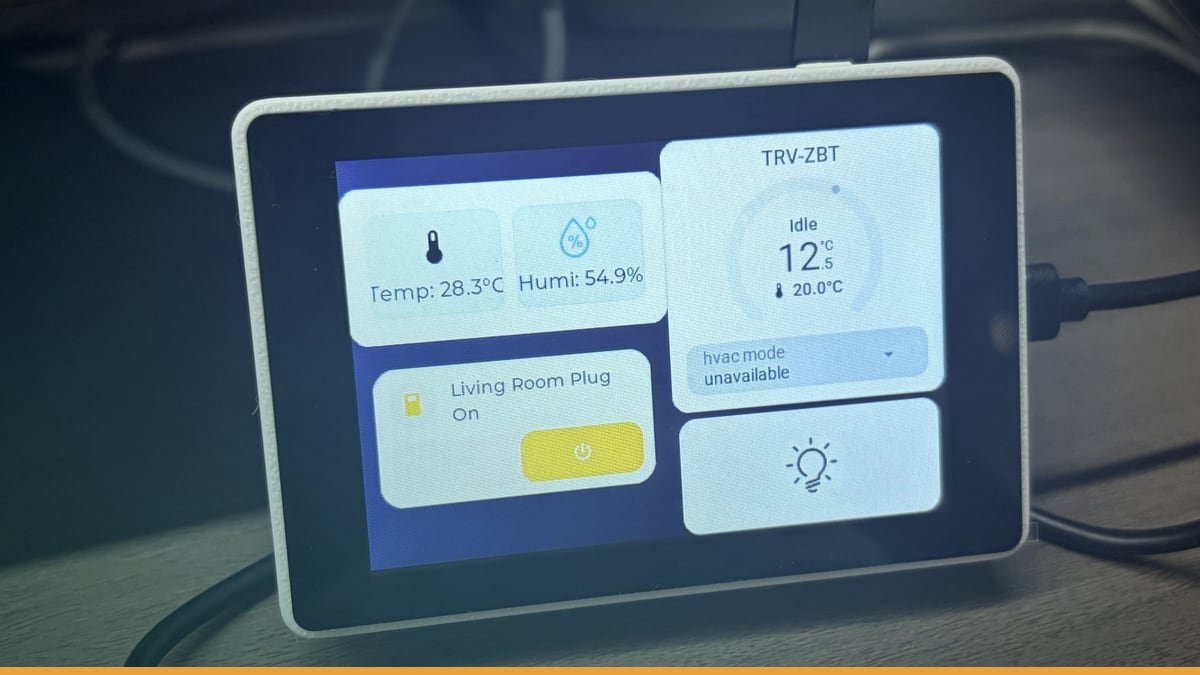
    Header image source: I wanted a small Home Assistant touchscreen, so I tried this ESP32-S3 screen – Share your Projects! – Home Assistant Community via Home Assistant Community via Google — cropped to 16:9 and colour-adjusted.

    Key takeaways

    • $15–$40 hardware boots straight into Home Assistant dashboard
    • No Android OS, no battery degradation, no lag
    • DIY firmware works on Cheap Yellow Display and Guition ESP32-S3-4848S040

    The Cheap Yellow Display and Guition ESP32-S3-4848S040 just landed firmware that boots straight into Home Assistant. No Android. No battery. No lag. Just a screen that wakes up inside your dashboard for $15–$40.

    This isn’t another hack using old tablets. It’s purpose-built hardware running purpose-built code. And it’s forcing smart home users to question why they were paying so much for similar functionality.


    The Two Paths We’ve Been Stuck On—And Why Both Suck

    Right now the smart-home wall-panel game has exactly two options: repurposed Android slabs and off-the-shelf touchscreen bricks. Neither is good.

    The Tablet Trap

    The Lenovo Tab M10 is the community’s go-to. At its price point, multiple units become expensive. And that tablet is still running a full-fat Android OS under the Home Assistant Companion kiosk. That means:

    • Lag. Background processes slowly turn your silky-smooth dashboard into a slideshow.
    • Updates. A single Android security patch can break kiosk mode, leaving you with a lock screen instead of your lights.
    • Battery rot. Even when plugged in 24/7, lithium-ion degrades. Over time, tablet batteries degrade and may need replacement.

    Worse, tablets weren’t designed for walls. They come with chunky cases, awkward viewing angles, and a form factor that screams “tech demo” instead of seamless integration.

    The Commercial Panel Fantasy

    Panels like the YC-SM08P (~$100) and YC-1011 (~$300+) solve the form-factor problem. They’re sleek, flush-mountable, and built for 24/7 duty. But:

    • Fixed specs. You get whatever screen brightness, resolution, and touch tech the manufacturer chose. Want a brighter panel? Too bad.
    • Locked layouts. Proprietary firmware means rigid menus. Swipe gestures? Custom icons? Forget it.
    • Upgrade roulette. If the vendor stops pushing updates, your $300 panel becomes a paperweight.

    And then there’s the WAF problem—the Wife Acceptance Factor. If nobody’s tapping the screen, it doesn’t matter how pretty it is.


    The DIY Escape Hatch: How This Firmware Works

    The new solution sidesteps both traps by running on dirt-cheap hardware: either the Cheap Yellow Display (ILI9341 + XPT2046 resistive touch) or the Guition ESP32-S3-4848S040 (ST7701S RGB + GT911 capacitive touch). Here’s the playbook:

    Hardware

    • Cheap Yellow Display: 2.8"–3.5", 320×240, resistive touch. Price: ~$15–$25.
    • Guition ESP32-S3-4848S040: 4", 480×480, capacitive touch. Price: ~$30–$40. Powered by an ESP32-S3 with Wi-Fi and BLE.

    Firmware Loading

    No coding. Download a pre-built binary, flash it via USB with esptool (ESP32) or Arduino IDE (Cheap Yellow Display). Five minutes later, the device boots straight into your Home Assistant dashboard.

    Why It Beats Tablets

    • No OS tax. The firmware is optimised for Home Assistant. No Android, no background tasks, no lag.
    • Lower power. Both devices sip 5V/1A, making them perfect for PoE or wall adapters.
    • Dedicated hardware. No battery rot, no accidental app launches, no update surprises.

    Hardware Face-Off: Cheap Yellow Display vs. Guition ESP32-S3-4848S040

    Not all DIY screens are equal. Here’s the breakdown:

    Cheap Yellow Display

    • Screen: ILI9341, 320×240, resistive touch (XPT2046).
    • Pros:
    • Dirt cheap. ~$15–$25 lets you deploy one in every room without guilt.
    • Dead simple. Power and USB are all you need.
    • Tiny. Fits standard 3D-printed cases, ideal for flush mounting.
    • Cons:
    • Postage-stamp resolution. 320×240 feels cramped for anything beyond basic buttons.
    • Resistive touch. Less responsive, requires more pressure.
    • Screen real estate. Hard to fit more than 4–6 buttons per page.

    Guition ESP32-S3-4848S040

    • Screen: ST7701S, 480×480, capacitive touch (GT911).
    • Pros:
    • Sharper. 480×480 is usable for text and icons.
    • Capacitive touch. Smoother, more responsive taps.
    • ESP32-S3. Wi-Fi and BLE let it run standalone for simple tasks.
    • Cons:
    • Pricier. ~$30–$40, though still a fraction of a tablet.
    • Soldering. Some setups need manual power and touch wiring.

    The Wildcard: The 4" Guition Alternative

    A smaller, cheaper Guition device (~$20) exists, but it needs manual coding to work with Home Assistant. The ESP32-S3-4848S040, by contrast, works out of the box with the new firmware.


    What You Can Actually Control

    This isn’t a full Home Assistant dashboard. You won’t be streaming camera feeds or monitoring complex data on a small screen. But for quick, room-specific controls, it’s surprisingly capable.

    Capabilities

    • Touch buttons for any Home Assistant entity—lights, switches, climate, media players.
    • Multi-page layouts with swipe gestures between screens.
    • Custom icons (though resolution limits creativity).
    • Flush mounting (the Cheap Yellow Display’s size makes this easy).

    Ideal Use Cases

    1. Single-room dashboards. Bedside control for lights, AC, and blinds. Kitchen control for appliances and timers.
    2. **Multi-device setups. One screen per floor, avoiding the single-device bottleneck.
    3. **Hidden panels. Flush-mounted in walls or cabinets.

    Limitations

    • No complex automations. Forget scenes with multiple conditions.
    • **No camera feeds. The hardware has limitations for complex tasks.
    • No voice control. If your household lives by “Hey Google,” these panels won’t replace it.

    Setup: How Hard Is It Really?

    The process is simpler than you’d think—but it’s not entirely plug-and-play.

    Firmware Flashing

    1. Tools: USB cable, esptool (ESP32) or Arduino IDE (Cheap Yellow Display).
    2. Steps:
    • Download the pre-built firmware binary for your device.
    • Connect via USB.
    • Run a single command (e.g., esptool.py --chip esp32s3 --port /dev/ttyUSB0 write_flash 0x0 firmware.bin).
    • Wait for the flashing process to complete.

    No coding. No compiling. Just one command.

    Home Assistant Integration

    Once flashed, the device appears as a native entity in Home Assistant. Configure it via the UI—no YAML, no extra hubs. The firmware handles the rest, talking to Home Assistant over Wi-Fi.

    Power and Mounting

    • Power: Both devices run on USB power. Options:
    • Wall adapters.
    • PoE splitters (for cable-free setups).
    • USB ports on smart switches or hubs.
    • Mounting:
    • Cheap Yellow Display: Can be mounted in various enclosures.
    • Guition ESP32-S3-4848S040: Can be mounted for installation.

    Cost Breakdown: DIY vs. Commercial vs. Repurposed

    |————————-|—————|————–|—————|——————–|

    The Takeaway

    • Cheap Yellow Display: The budget king. At $15–$25, you can carpet every room without blinking.
    • Guition ESP32-S3-4848S040: The sweet spot. $30–$40 buys a sharper screen, capacitive touch, and Wi-Fi/BLE.
    • Tablets: More expensive than DIY options.
    • Commercial panels: Overpriced for what they deliver. The YC-1011 is powerful but costs as much as a used laptop.

    The Catch: Why This Isn’t for Everyone

    This solution is a game-changer—but it’s not a universal fix. Here’s what might trip you up:

    Screen Size Limits

    If you’re used to larger tablets displaying complex information, these screens will feel limited. They’re single-purpose tools, not dashboard replacements.

    Touch Responsiveness

    • Cheap Yellow Display: Resistive touch feels primitive. It works, but it’s not as smooth as a tablet or the Guition’s capacitive screen.
    • Guition ESP32-S3-4848S040: Capacitive touch is better, but it’s still not as responsive as a modern smartphone.

    WAF (Wife Acceptance Factor)

    If your household ignores touch panels in favour of voice commands or physical switches, these devices won’t change that. They’re supplementary, not primary interfaces.

    DIY Stigma

    Flashing firmware, wiring power, and debugging Wi-Fi aren’t for everyone. If you break into a cold sweat at the sight of a soldering iron, this might not be your scene—though the process is simpler than most smart-home projects.


    Future-Proofing: Where Does This Go Next?

    The firmware is open-source, so the community could take it in some interesting directions:

    Firmware Updates

    • MQTT support: Let the panels run standalone without Home Assistant, turning them into local control hubs.
    • LVGL integration: Add richer UI elements like sliders, graphs, and animations.
    • BLE/Wi-Fi direct control: Let the panels talk directly to smart devices (switches, sensors) without Home Assistant in the loop.

    Hardware Trends

    The ESP32-S3’s dual-core processor and Wi-Fi/BLE open up possibilities: Say voice commands to the panel itself, no cloud required.

    • Offline operation: Store basic automations locally, so the panel keeps working even if Home Assistant crashes.
    • Multi-protocol support: Add Zigbee or Z-Wave radios for direct device pairing.

    Competition


    Who Should Try This—and Who Should Walk Away

    Try This If…

    • You want sub-$50 control panels for specific rooms (bedroom, kitchen, garage).
    • You hate OS bloat and battery rot—dedicated hardware wins every time.
    • You’re comfortable with DIY (flashing firmware, basic wiring).
    • You need multiple panels and want to avoid high costs.

    Stick to Tablets/Commercial Panels If…

    • You need large screens for complex dashboards.
    • Your household won’t touch panels (voice assistants rule).
    • You lack time for setup and want plug-and-play.
    • You need advanced features on your control panels.

    The Big Question: Will This Kill the Tablet Market?

    Unlikely—at least not yet. Tablets still have a place for users who want comprehensive dashboards. But for room-specific controls, this DIY approach is a no-brainer.

    The real disruption here isn’t the hardware. It’s the mindset shift. We’ve been trained to think smart-home control panels need to be expensive, power-hungry, or repurposed from other devices. This firmware proves that’s nonsense.

    The question now: **** If the DIY community keeps pushing, we might see more affordable ready-made panels. And that’s when the real fun begins.


  • Why Use Home Assistant?: The Case for Local, Private, and Powerful Home Automation

    Why Use Home Assistant?: The Case for Local, Private, and Powerful Home Automation

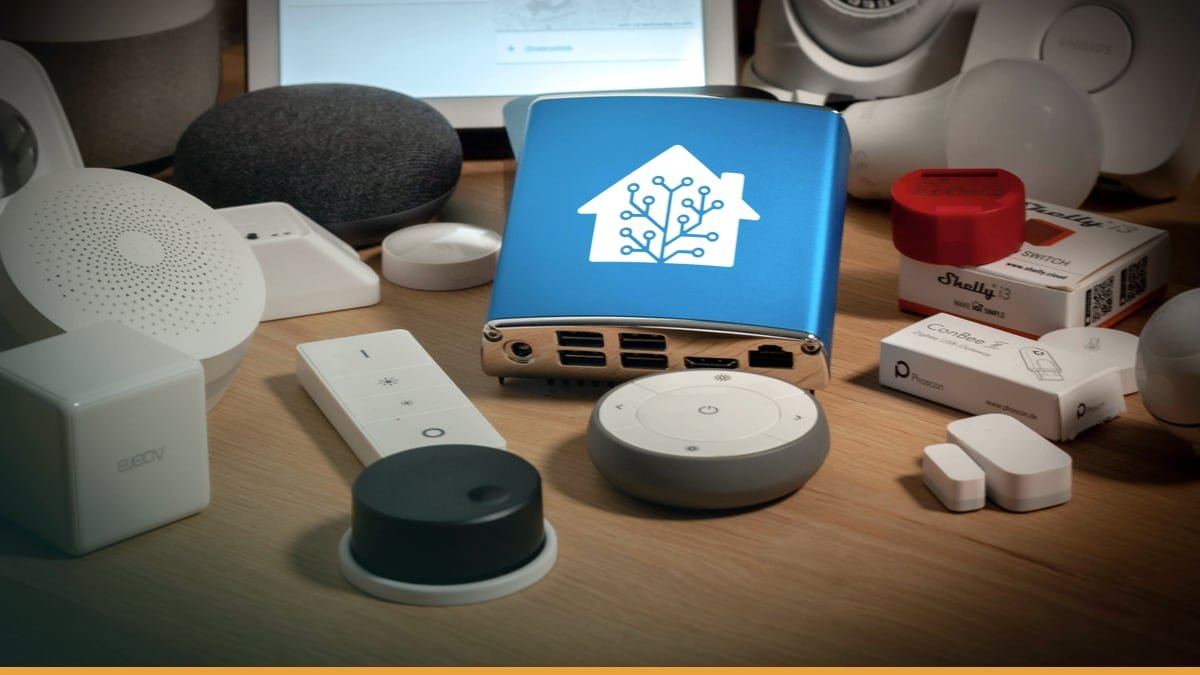
    Header image source: Home Assistant Blue! – Home Assistant via Home Assistant via Google — cropped to 16:9 and colour-adjusted.

    Key takeaways

    • Home Assistant runs entirely on your hardware for maximum privacy
    • Unifies thousands of devices into one interface with native Tailscale support
    • Enables complex automations and debugging without cloud dependencies

    Home Assistant now offers native Tailscale support, and the community is engaged. It provides secure remote access. It keeps your data secure. It provides secure remote access without relying on cloud services. That’s not just an update. That’s a middle finger to the cloud-dependent smart home status quo.

    Here’s the direct answer: Home Assistant puts you in control. Your data stays on your hardware. Your devices work together through unified integration. Your automations can range from simple to complex without paying a subscription. This isn’t another smart home app. It’s a fundamental shift in how home automation should work.

    The real story isn’t the promise. It’s the execution.


    Privacy Isn’t a Feature. It’s the Foundation.

    Home Assistant doesn’t just talk about privacy. It runs entirely on your own hardware, in your own home, with no mandatory cloud servers or paywalled features. That’s not marketing copy. That’s the core principle. Compare that to cloud-based platforms where data typically flows through corporate servers. With Home Assistant, your data doesn’t leave your network unless you explicitly send it somewhere.

    But privacy isn’t absolute. If you enable Alexa or Google Assistant integrations, you’re reintroducing cloud dependencies. The security advantage evaporates. The workaround? Local voice assistants like Piper and Whisper, which process speech entirely on-device. They’re clunkier than Siri or Alexa—expect mishears and slower responses—but they’re improving. The trajectory is clear: Home Assistant is building a future where even voice control doesn’t require surrendering your data to a tech giant.

    The trade-off is real. Home Assistant has no paywalled features, but requires self-support. If issues arise, you’re responsible for troubleshooting. For users who prioritize privacy over convenience, that’s a fair exchange. For everyone else, it’s a dealbreaker.


    One Interface to Rule Them All

    Smart homes today are a fragmented mess. Different devices often require separate apps. Different devices often require separate apps. Various smart home technologies come with their own ecosystems and limitations. Home Assistant cuts through the noise by integrating thousands of devices into a single interface. It doesn’t just bridge ecosystems. It merges them.

    Take 433 MHz RF sensors. These are older, low-power devices often used for motion detection or door/window alarms. Most modern platforms ignore them entirely. Home Assistant can integrate them via a USB antenna like the RFXcom. Suddenly, those “dumb” sensors become part of your automations—triggering lights, alerting you to movement, or feeding into energy-saving routines. That’s not just convenience. It’s future-proofing. Home Assistant lets you mix old and new hardware, proprietary and open-source, without being locked into a single vendor’s vision.

    The exceptions prove the rule. Some ecosystems may require additional work for integration. Some ecosystems require dedicated hardware. But even these limitations are temporary. Home Assistant’s open-source nature means community developers can—and do—build integrations faster than corporate teams can lock down their APIs. The result? A platform that adapts to your hardware, not the other way around.


    Automation Isn’t an Afterthought. It’s the Whole Point.

    Most smart home platforms treat automation as a checkbox feature. Basic automation examples Basic automation examples Home Assistant treats automation as a first-class citizen. It’s not just a feature. It’s a superpower.

    Start with presence detection. Home Assistant’s mobile apps can send your location back to your server, enabling automations like garage doors opening as you pull into the driveway or thermostats adjusting when you leave the house. That’s not new—cloud platforms do this too. But Home Assistant lets you debug these automations in real-time. You can watch them execute, check logs to see why something triggered (or didn’t), and manually test conditions. This level of transparency is unheard of in cloud-dependent systems, where automations are black boxes.

    Then there’s energy management. The Home Energy Management feature provides granular insights into your power usage, tracking everything from solar production to individual appliance consumption. Want to know detailed energy consumption of specific devices? Home Assistant can provide insights and enable energy-saving automations. Cloud platforms may offer energy tracking but with different limitations.

    The catch? Complex automations require hardware. Energy monitoring needs smart plugs or dedicated sensors. Presence detection needs reliable GPS or Wi-Fi tracking. Home Assistant gives you the tools, but it doesn’t magic away the physics. That’s not a flaw. It’s a feature. You’re not limited by what a cloud provider allows. You’re limited by what you’re willing to build.


    Remote Access Without the Cloud: Your Home, Your Rules

    Remote access is where most smart home platforms force you into their cloud. Many smart home platforms route commands through cloud servers. Home Assistant flips the script. Tailscale integration provides secure, peer-to-peer remote access without exposing ports to the internet.

    Tailscale is a VPN service that creates a private network between your devices, using WireGuard under the hood. Install it on your Home Assistant server and your phone, and suddenly you’re accessing your dashboard as if you were on your local network. Simplified remote access. No cloud middlemen. It’s not as seamless as opening an app and having everything “just work,” but the trade-off is control. You’re not relying on a corporation’s servers staying online or their security staying intact.

    For quick interactions, the official Home Assistant apps offer a middle ground. They support Apple Watch, letting you toggle devices or check notifications without pulling out your phone. Again, this isn’t groundbreaking—cloud platforms have had watch apps for years. But Home Assistant’s version works without sending your commands through a third-party server. That’s the difference between convenience and sovereignty.


    Scalability: Grow Without Limits

    Home Assistant doesn’t care what hardware you run it on. A Raspberry Pi is enough to get started, but you’re not locked into it. Running Home Assistant in Docker on separate hardware improves fault tolerance and allows co-hosting other services. Need more power? Move it to a NAS. Need enterprise-grade reliability? Run it on a server. The platform scales from a single-room setup to a whole-home deployment without forcing you into a specific ecosystem.

    This flexibility extends to integrations. Want to add a Zigbee hub? Add compatible hardware. Need Z-Wave? Add compatible hardware. Need more connectivity? Offload some services to Docker containers on another machine. Home Assistant doesn’t just tolerate this kind of tinkering. It encourages it. The result is a system that evolves with your needs, rather than one you outgrow.

    The open-source model accelerates this adaptability. Community-developed integrations emerge faster than corporate teams can lock down their APIs. Need support for a niche device? Someone’s probably already built it. Want to experiment with local AI? The Home Assistant community is on it. This isn’t just about avoiding vendor lock-in. It’s about tapping into a hive mind of power users and developers who are pushing the boundaries of what home automation can do.


    The Catch: Control Comes With Costs

    Home Assistant isn’t for everyone. The biggest trade-off is technical overhead. Setup isn’t plug-and-play. You’ll need to flash firmware, configure YAML files, and troubleshoot integrations. Maintenance isn’t hands-off. Updates can break things, and debugging requires diving into logs. If you’re not comfortable with a command line or a forum thread, Home Assistant will frustrate you.

    Then there’s the hardware cost. Advanced features like energy monitoring or local voice assistants require additional sensors, hubs, or compute power. A basic setup might run on a Raspberry Pi, but a fully featured system could demand a NAS, multiple dongles, and dedicated AI hardware. That’s not Home Assistant’s fault. It’s the reality of building a system that does everything cloud platforms handle for you. The difference is that with Home Assistant, you’re investing in your infrastructure, not renting someone else’s.

    Privacy isn’t absolute, either. Linking Alexa or Google Assistant reintroduces cloud dependencies, negating Home Assistant’s security advantages. Even local voice assistants like Piper require more setup than cloud-based alternatives. For users who prioritize convenience over control, these trade-offs aren’t worth it.


    Who Should Use Home Assistant?

    Home Assistant is for three kinds of users:

    1. The privacy-conscious. If you’re unwilling to share your home’s data with tech giants, Home Assistant is the only viable alternative. It’s not just about avoiding ads or tracking. It’s about owning your digital footprint. No telemetry. No mandatory cloud. No hidden subscriptions.
    1. The power users. If you want advanced automations, Home Assistant delivers. Presence detection, energy management, real-time debugging—these aren’t add-ons. They’re core features. The platform is built for users who see their smart home as a project, not a product.
    1. The long-term adopters. If you’re tired of vendor lock-in, Home Assistant is a hedge against obsolescence. Proprietary ecosystems come and go. Home Assistant adapts. It’s open-source, self-hosted, and community-driven—meaning it evolves with your needs, not a corporation’s roadmap.

    It’s not for everyone. Casual users who want simple automations will find Home Assistant overkill. Users unwilling to troubleshoot or invest in hardware will hit walls. And those who don’t care about privacy won’t see the value in the trade-offs.


    The Future: Local AI and Voice Assistants

    Home Assistant’s roadmap points toward a future where even voice control and AI don’t require cloud dependencies. Local voice assistants like Piper and Whisper are already emerging as alternatives to Siri and Alexa. They’re not as polished—yet—but they’re improving rapidly. The same goes for local AI. Early integrations like Home Assistant’s conversation agent hint at a future where your smart home’s intelligence runs on-device, not in a data center.

    This isn’t just about privacy. Local AI could enable smarter automations without latency. Imagine a system that learns your routines without sending your data to the cloud, or one that adapts to your behavior in real-time. Cloud platforms will always be limited by bandwidth and server load. Home Assistant’s local-first approach removes those bottlenecks.

    The open-source model accelerates this innovation. Community-driven development means new features emerge faster than corporate teams can ship them. Need local AI for your smart home? Someone’s already working on it. Want better energy insights? The community delivers. This isn’t speculation. It’s how Home Assistant has operated for years.


    The Open Question: Can Home Assistant Cross the Chasm?

    Home Assistant is powerful, private, and endlessly customizable—but it’s still niche. The question isn’t whether it works. It’s whether it can become mainstream without sacrificing what makes it special.

    The biggest hurdle isn’t technical. It’s cultural. Most users don’t want to tinker. They want things to work seamlessly. Home Assistant’s strength—its flexibility—is also its barrier to adoption. Can it simplify setup without compromising control? Can it appeal to casual users without alienating power users? The answer isn’t clear.

    What is clear is that Home Assistant represents a different vision for home automation. One where your data stays yours. One where your devices work together, not against each other. One where your system evolves with your needs, not a corporation’s roadmap. That vision won’t appeal to everyone. But for those who value control over convenience, it’s the only game in town.

    The real question isn’t whether Home Assistant can cross the chasm. It’s whether the rest of the smart home industry will ever catch up.